How To Fix Electric Kick Scooter Throttle Paddle Snapping?
Your electric kick scooter suddenly stops responding. You push the throttle paddle, but nothing happens. Or worse, you hear a snap and feel it go loose under your thumb.
This is a common problem for scooter riders. The throttle paddle takes a lot of daily stress. Over time, it can wear out, crack, or disconnect.
Throttle paddle snapping usually means one of two things. There is a mechanical break inside the housing. Or there is an electrical disconnection in the wiring.
The good news? You do not always need a replacement. Many throttle issues come from simple things like corrosion, loose wires, or dirt buildup.
In a Nutshell
- Check the basics first. Make sure your battery has enough charge. A low battery can sometimes mimic throttle problems.
- Inspect the throttle housing. Look for cracks, loose screws, or visible damage. Physical wear is often the main culprit.
- Test the wiring. Use a multimeter to check for continuity. This tells you if the problem is electrical or mechanical.
- Clean the contacts. Corrosion and dirt build up over time. A soft brush or compressed air can clear this safely.
- Verify the brake switch. Some scooters will not engage the throttle if the brake lever switch is faulty.
- Decide on repair or replacement. Minor issues often just need cleaning or tightening. Severe damage usually means you need a new throttle assembly.
- Match pin configurations. If you replace the throttle, double check the pins match your scooter model exactly.
Understanding the Throttle Paddle Mechanism
The throttle paddle works like the gas pedal in a car. When you squeeze it, electrical signals travel through wires to tell your scooter’s motor how fast to go. Understanding this system helps you fix problems faster.
Your throttle paddle connects to a sensor inside the handlebar housing. This sensor detects how hard you squeeze and sends that information to the scooter’s controller. The controller then adjusts power to the motor. If any part of this chain breaks, your scooter stops responding.
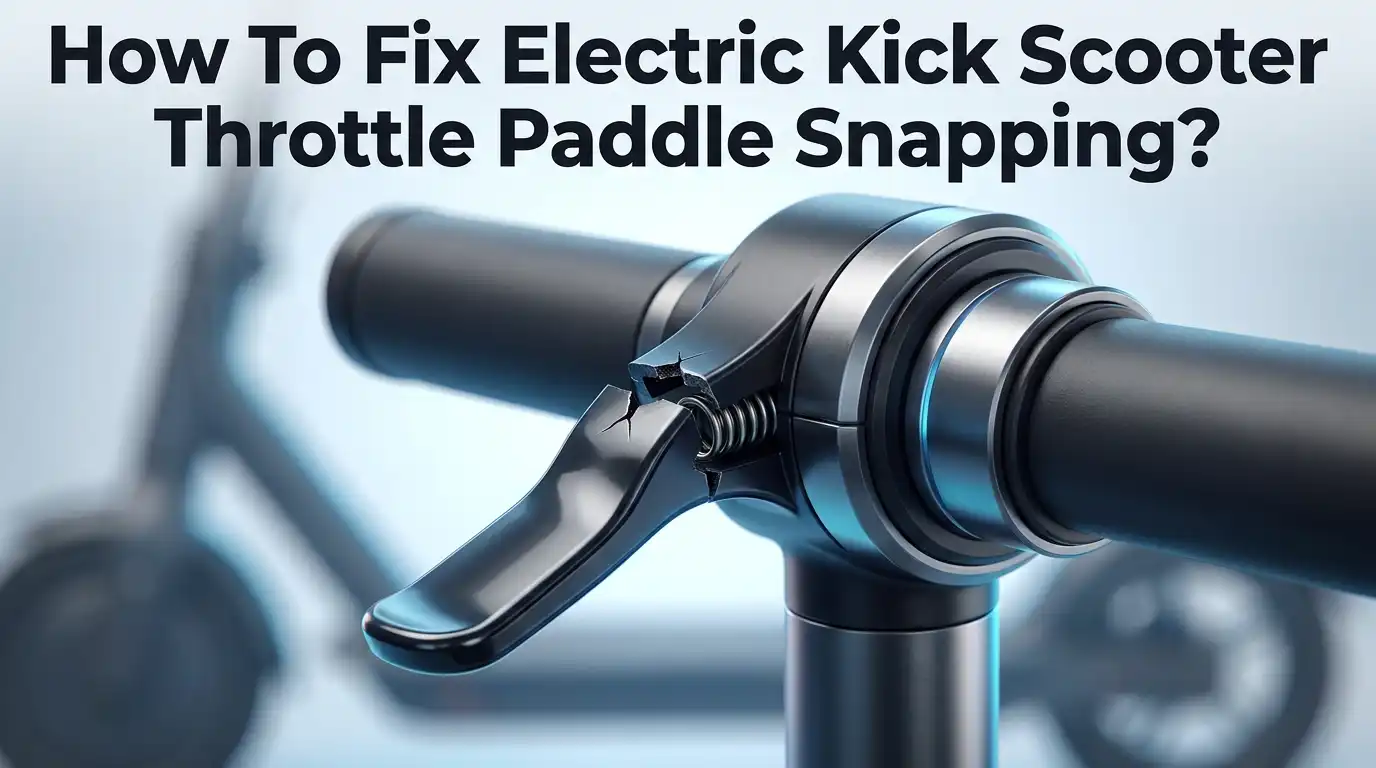
The mechanical side includes the paddle itself, springs, and internal contacts. These parts experience constant pressure from your hand. Over time, springs weaken and contacts wear down. Physical damage from drops or crashes can also snap components inside the housing.
The electrical side involves wires, connectors, and circuit boards. Moisture and salt from rain or sweat cause corrosion on these connections. Loose wires can disconnect completely, stopping signals from reaching the controller. Corrosion is actually one of the most common culprits behind throttle failure.
Your scooter’s brake switch also plays a role here. Many models have a safety feature that disables the throttle when you pull the brake lever. If this switch malfunctions, your throttle might not engage even if the paddle itself works fine.
When your throttle paddle snaps, it could mean the physical component broke, the wiring disconnected, or the electrical signal stopped flowing. The key is identifying which part failed. Some issues require simple cleaning or tightening. Others need component replacement. Knowing how these systems work helps you spot the real problem quickly and choose the right fix.
Common Causes of Throttle Paddle Snapping
Throttle paddle snapping happens for several clear reasons. Understanding these causes helps you fix the problem faster and prevent it from happening again.
Wear and tear is the most common culprit. Your throttle paddle gets used thousands of times. Springs weaken, plastic cracks, and internal parts loosen over time. This is especially true if you ride frequently or use rough terrain.
Corrosion destroys electrical connections inside the throttle housing. Moisture from rain, sweat, and humidity creates rust on metal contacts. Corroded contacts break the electrical signal between your paddle and the scooter’s motor controller. Salt air makes this problem worse.
Loose connections interrupt the signal path. Vibrations from riding shake screws and connectors loose. A single disconnected wire stops your throttle from working. This often looks like a snap because the throttle suddenly stops responding.
Physical damage from falls or impacts cracks the throttle housing. A cracked case lets moisture inside. Broken internal springs stop the paddle from returning to its resting position. Hard impacts can bend metal components inside.
Wiring issues develop when insulation wears away or connectors pull apart. Exposed wires short circuit or lose contact with their terminals. Temperature changes make plastic connectors expand and contract, loosening their grip.
Pin misalignment occurs after repairs. If someone replaced the throttle incorrectly, the pins may not match your scooter’s connector. Wrong pin configuration prevents electrical signals from reaching the motor.
Battery problems can mimic throttle snapping. A low battery sometimes fails to power the throttle mechanism. The scooter acts like the throttle is broken when it is actually a power issue.
Each cause requires a different fix. Identifying which one affects your scooter is the first step toward a working throttle again.
Tools and Preparations Before You Start
Before you start fixing your throttle paddle, gather the right tools and prepare your workspace. This step saves time and prevents frustration.
Start by collecting basic hand tools. You will need a screwdriver set with both Phillips and flathead options. Most scooter throttles use small screws, so precision screwdrivers work best. Grab an adjustable wrench or socket set for any larger fasteners on your handlebar assembly.
Get a multimeter for electrical testing. This device checks whether wires carry power and signals correctly. You can find multimeters at most hardware stores or electronics shops. Testing wiring prevents unnecessary replacement costs.
Prepare cleaning supplies next. Grab a soft brush, compressed air canister, and isopropyl alcohol. These items remove dirt and corrosion from electrical contacts without causing damage. Avoid water or harsh chemicals that might harm circuit boards.
Find a clean, well lit workspace. Your kitchen table or workbench works fine. Lay down a cloth to protect the surface and catch small screws. Good lighting helps you see tiny components and connections clearly.
Have your scooter’s manual nearby if possible. It shows you exactly where throttle components sit and how they connect. The manual also lists correct pin configurations for your specific model.
Wear safety glasses to protect your eyes from small parts or debris. Keep a small container for screws and fasteners so nothing gets lost. Organization prevents reassembly headaches later.
Finally, charge your scooter battery fully before starting. A weak battery can mimic throttle problems and waste your troubleshooting time. Once everything is ready, you can begin diagnosing and fixing your throttle issue confidently.
Step-by-Step Guide to Diagnosing the Problem
Start your diagnosis by checking the battery charge level first. A weak or dead battery can make your throttle seem broken when it actually works fine. Plug your scooter in and let it charge completely before moving forward.
Next, inspect the throttle paddle itself visually. Look for cracks, breaks, or pieces that fell off. Check if the paddle moves smoothly when you press it or if it feels stuck. Examine the handlebar housing around the throttle for damage from drops or impacts.
Now test the electrical system with a multimeter. Set your multimeter to check for continuity. Touch the probes to the throttle wires and see if you get a reading. No reading means you have an electrical break somewhere in the circuit.
Look inside the throttle housing for corrosion or dirt buildup. Corroded contacts prevent electrical signals from traveling properly. Use a soft brush or compressed air to clean away debris gently. Be careful not to push dirt deeper into the mechanism.
Check all wire connections at the throttle assembly. Wiggle each connector gently to see if any are loose. A connection that moves too easily needs tightening. Look for bent pins or damaged connectors that prevent proper contact.
Test your brake lever switch next. Press the brake lever while checking if the throttle responds. Some scooters disable the throttle when you pull the brake. A faulty brake switch can trick your scooter into thinking you want to stop.
Finally, document what you find. Take photos of any damage you see. Write down which tests passed and which failed. This information helps you decide whether cleaning and tightening will work or if you need replacement parts.
How to Repair or Replace the Throttle Assembly
The throttle assembly sits at the heart of your scooter’s speed control. Understanding how to repair or replace it saves you time and money.
Start with a visual inspection. Remove the throttle housing carefully using the appropriate tools. Look for cracks, broken springs, or bent metal components. Take photos before disassembly so you remember how everything fits together. Check if the paddle moves freely or feels stuck.
Clean the internal parts next. Use a soft brush or compressed air to remove dust and debris. Corrosion appears as green or white crusty buildup on metal contacts. Gently clean these corroded areas with a dry cloth. Never use water, as moisture causes more electrical problems.
Test the electrical connections. Use your multimeter to check for continuity between the wires. Set it to the resistance mode and touch the probes to each wire contact. You should see a reading. No reading means a broken wire or bad connection.
Inspect the connector pins. These small metal pieces must align perfectly. Bent or corroded pins prevent proper electrical signals. Straighten bent pins carefully with needle nose pliers if possible.
Know when to replace the assembly. If the housing has large cracks, springs are broken, or the paddle won’t move, replacement is your best option. Severe corrosion that won’t clean away also signals replacement time.
Reconnect everything properly. Match each wire to its original position. Double check the pin configuration against your manual. Secure all connections firmly. Test the throttle before fully reassembling your scooter.
Testing and Calibrating the Throttle After Repair
After you repair or replace your throttle assembly, testing confirms everything works correctly. This step prevents frustration and ensures your scooter runs safely.
Start with a visual check first. Look at the throttle paddle to confirm it moves smoothly without resistance. The paddle should return to its resting position quickly when you release it. If it sticks or moves slowly, something needs adjustment.
Next, test the electrical response without riding. Turn on your scooter and hold it steady. Gently squeeze the throttle paddle and listen for motor sounds. The motor should respond immediately to your input. If nothing happens, check your battery charge level again and verify all wire connections are tight.
Now perform a stationary spin test. Lift your scooter so the wheel spins freely. Squeeze the throttle gently and watch the wheel speed increase. Release the throttle and confirm the wheel slows down. The response should feel smooth and proportional to your input pressure.
Test brake interaction next. Press your brake lever while squeezing the throttle. Your scooter should stop or reduce speed immediately. This safety feature protects you during riding.
Finally, take a short test ride in a safe area. Start on flat ground away from traffic and obstacles. Accelerate slowly and check throttle responsiveness. Test braking several times. Listen for unusual sounds like squeaking or grinding.
If the throttle responds smoothly, feels responsive, and the brake works properly, your repair succeeded. If problems remain, recheck your wire connections and connector pins. Incorrect pin alignment often causes continued issues after replacement.
Tips to Prevent Future Throttle Failures
Your electric scooter throttle can fail again if you don’t take steps to protect it. Prevention is far easier than repair.
Check your riding habits first. Avoid sudden, aggressive throttle movements. Smooth acceleration puts less stress on the paddle mechanism. Jerky throttle inputs cause internal components to wear faster and connectors to loosen over time.
Keep moisture away from the throttle area. Water and humidity cause corrosion inside the housing. After riding in wet conditions, dry your scooter completely. Store it in a dry location, not in garages or basements with high humidity.
Inspect connections monthly. Vibration from riding gradually loosens wire connections at the throttle assembly. Set a reminder to check these connections every 30 days. Tighten any loose wires or connectors you find.
Clean the throttle housing regularly. Dust and debris accumulate inside and create friction. Use compressed air to blow out the interior every few weeks. This prevents buildup that stresses moving parts.
Apply protective coating to exposed metal. Corrosion starts on bare metal pins and connectors. A thin layer of protective spray designed for electronics prevents rust from forming.
Avoid extreme temperature changes. Rapid temperature shifts cause plastic housing to crack and expand. Don’t leave your scooter in direct sunlight for hours, then immediately store it in a cold shed.
Reduce unnecessary throttle use. Coast downhill instead of using throttle. Walk your scooter through crowded areas. Less throttle engagement means less wear on internal springs and contacts.
Replace worn brake pads promptly. A faulty brake lever switch sometimes triggers throttle problems. Keeping brakes in good condition prevents related throttle issues from developing.
Troubleshooting Persistent Throttle Issues
When your throttle paddle snaps or becomes unresponsive, you need to identify what’s actually broken. Start by determining if the problem is mechanical or electrical. A snapped paddle means the physical part broke. An unresponsive throttle suggests electrical failure instead.
Check your battery charge first. A dead or low battery can make the throttle seem broken when it’s actually just powered down. Turn on your scooter and listen for beeping sounds that indicate low power.
Next, inspect the throttle housing for visible cracks or breaks. Look at both the paddle and the housing around it. Physical damage here usually means replacement is necessary. Small stress cracks may spread quickly, so don’t delay action.
Test your wiring connections with a multimeter. Set it to check for continuity along the throttle wires. Broken or corroded wires prevent electrical signals from reaching your motor. Loose connections at the throttle plug also cause signal loss.
Clean the throttle connector pins with a soft brush. Corrosion appears as green or white buildup on metal contacts. This buildup blocks electrical flow even when connections seem tight. Gently scrub away any discoloration.
Check if your brake lever switch works properly. Many scooters won’t respond to throttle input if the brake switch is faulty. Squeeze your brake and listen for a clicking sound that confirms it’s functioning.
If the paddle snapped completely, you’ll likely need a replacement assembly. However, test all electrical connections first. Many riders replace throttles unnecessarily when a loose wire was the real culprit. Thorough troubleshooting saves time and money.
Final Thoughts
A snapped throttle paddle feels like a big problem. But most of the time, it has a simple fix.
You just need to find the real cause first. Check your wiring, clean the contacts, and test the connections before you buy anything new.
Small issues often cause big symptoms. A loose wire or dirty pin can make your throttle act like it’s completely broken. Always rule these out first.
If your paddle actually snapped or cracked, replacement becomes your best option. Trying to glue or force a broken paddle rarely works well long term.
Pick a replacement throttle that matches your scooter’s pin configuration. This single step prevents most installation headaches people face.
Take your time during installation. Rushing leads to mismatched wires and frustrating troubleshooting later.
Testing matters just as much as the repair itself. Always check your throttle before you ride again. A quick stationary test saves you from problems on the road.
Prevention keeps your throttle working longer. Clean it often, protect it from moisture, and avoid rough throttle movements.
These small habits reduce wear on internal parts. They also lower your chances of dealing with this issue again soon.
Electric scooters take daily stress from vibration, weather, and constant use. Your throttle assembly feels this stress more than most other parts.
Regular checks help you catch problems early. You’ll notice loose connections or corrosion before they turn into bigger failures.
Fixing a throttle paddle does not require expert skills. With patience and the right steps, most riders handle this repair themselves.
Stay calm, work through each step, and test thoroughly. Your scooter will get back to smooth, reliable performance soon.
Frequently Asked Questions
Can a snapped throttle paddle be repaired or does it need replacement?
A snapped throttle paddle usually requires replacement rather than repair. The paddle structure typically cannot withstand gluing or welding without creating safety risks. However, before you replace the entire assembly, check if the internal wiring is still intact. Sometimes the paddle breaks but the electrical connections remain functional. If only the paddle cracked, you might find replacement paddle covers. If the internal mechanism snapped, the full throttle assembly needs replacement.
How do I know which replacement throttle matches my scooter?
Your scooter’s manual lists the exact throttle model and pin configuration. Check your scooter’s brand and year to find this information. The pin configuration matters most during installation. Incorrect pins can cause the throttle to malfunction or damage your scooter’s controller. Contact your scooter’s manufacturer with your model number. They can confirm the correct replacement part. Take photos of your current throttle before removal to help identify the right match.
Why does my throttle still snap after I fix it?
Moisture and vibration are the main culprits behind repeated throttle failure. Water enters the throttle housing and causes corrosion on internal contacts. Vibration from riding gradually loosens wire connections over time. To prevent this, keep the throttle area dry and inspect connections monthly. Apply protective coating to exposed metal parts. Avoid aggressive throttle movements that create extra stress on the mechanism.
What if my throttle paddle snaps but the scooter still moves?
Your brake lever switch might be preventing throttle response. Many scooters have a safety feature that disables the throttle when the brake is engaged. Test your brake lever to see if it clicks properly. If the brake switch works fine, the electrical wiring may have a loose connection. Use a multimeter to test for continuity in the wiring. A loose wire can make throttle input seem completely broken when it’s actually just disconnected.
Hi, I’m Rosie Tate — a tech enthusiast, gadget geek, and the creator of RapidConvertLab! 🚀 I’ve spent years exploring the ever-evolving world of electronics, smart devices, and Amazon’s hidden tech treasures. Through my honest, hands-on reviews, I help everyday shoppers cut through the noise and pick gadgets that truly deliver value. When I’m not testing a new device, I’m probably unboxing one! 📦✨