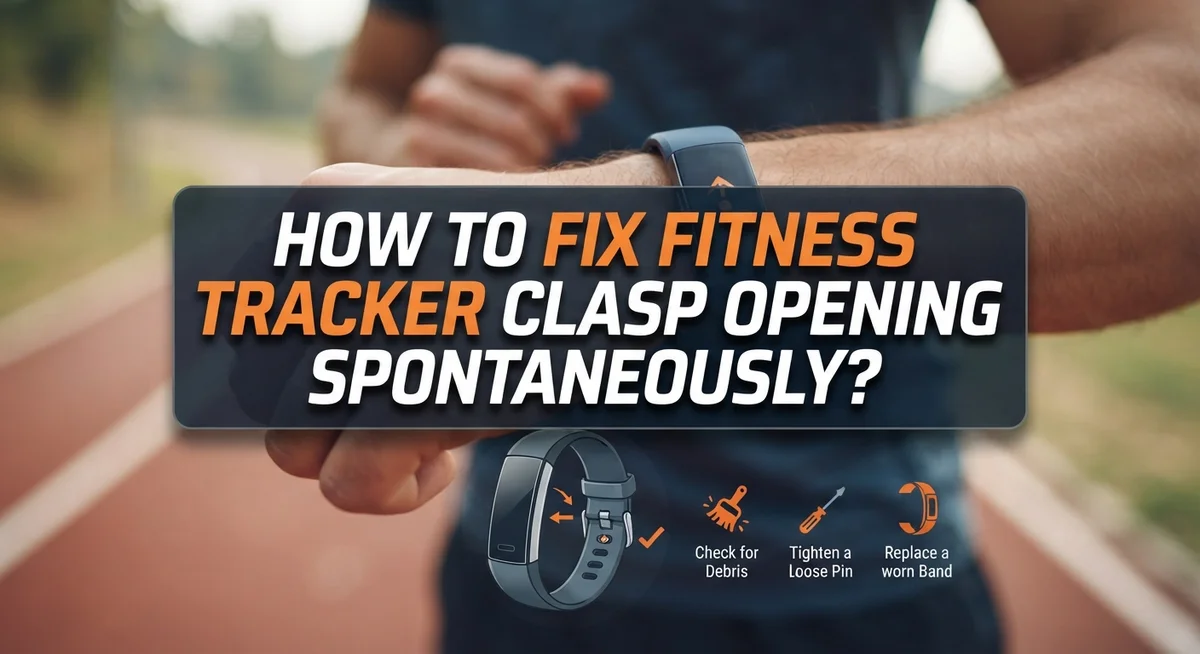
How To Fix Fitness Tracker Clasp Opening Spontaneously?
Does your fitness tracker clasp keep popping open at the worst times? You are not alone. Many people face this annoying issue during workouts or daily wear.
The good news is that this problem usually has a simple fix. Most spontaneous clasp openings happen due to fit issues, not device defects. Your tracker might sit too loose on your wrist, or the clasp might not close all the way.
This guide will walk you through why your fitness tracker clasp opens on its own. We will cover the common causes behind this frustrating problem.
You will learn simple steps to properly close your clasp every time. We will also show you how to check if your band fits correctly on your wrist.
By the end, you will know exactly how to adjust your tracker for a snug, secure fit. No more worrying about your device falling off during a run or workout.
Let’s solve this problem together and keep your fitness tracker exactly where it belongs.
In a Nutshell
Here is a quick summary if you are short on time.
-
Check the closure first. Most clasp problems happen because the clasp did not click all the way shut. Always press and confirm a full, secure lock before you start moving.
-
Fit matters more than you think. A loose tracker slides around your wrist. This movement puts stress on the clasp and pops it open during normal activity.
-
Remove extra links if needed. If your band feels loose, take out a link or two. A snug fit keeps the clasp in its correct position.
-
Wrist position affects stability. Your tracker should sit where the brand designed it to sit, usually just above the wrist bone. Wrong placement causes constant clasp stress.
-
This is usually not a defect. In most cases, this issue is a fit or closure habit, not a broken device. Small adjustments fix the problem quickly.
-
Consistency prevents repeat issues. Once you nail the fit and closure, your clasp should stay shut through workouts, sleep, and daily wear.
Why Your Fitness Tracker Clasp Keeps Opening
A fitness tracker clasp opens spontaneously for several reasons. Understanding these causes helps you fix the problem quickly.
Loose band fit is the main culprit. When your tracker sits too loose on your wrist, it slides around during movement. This sliding motion puts pressure on the clasp from different angles. The clasp then pops open because it is not sitting in its intended position.
Improper clasp closure creates instability. You might think your clasp is fully closed when it actually is not. Clasps need to click completely into place. A partial closure feels secure but fails under wrist movement or pressure.
Wrist position matters more than you realize. Your fitness tracker should sit in a specific spot on your wrist, usually just above the wrist bone. When you wear it too high or too low, the clasp experiences uneven stress. This stress causes it to release unexpectedly.
Band size directly affects clasp function. If your band has removable links, extra links make the fit loose. A loose fit allows your tracker to move up and down your wrist. This constant movement weakens the clasp closure over time.
Swelling and activity change fit throughout the day. Your wrist size fluctuates based on activity level, temperature, and time of day. Morning swelling or post workout inflammation can loosen your band. This temporary looseness triggers clasp opening.
Repetitive bending strains the clasp mechanism. When you bend your wrist frequently, the clasp experiences repeated stress. If your band is even slightly loose, this bending motion forces the clasp open.
The good news is that most of these issues are fixable without replacing your device. Focus on achieving the correct fit first, then master proper clasp closure technique. These two steps solve spontaneous opening in the vast majority of cases.
Understanding How the Clasp Mechanism Works
A fitness tracker clasp works like a simple locking mechanism. The clasp has two main parts: a hook or post on one side and a slot or catch on the other side. When you press these parts together, they lock into place and hold your band secure.
The clasp relies on proper alignment and pressure to function correctly. You must push firmly until you hear or feel a click. This click tells you the clasp has engaged fully. Without that click, the clasp remains partially open and can slip free during movement.
Your wrist position directly affects how well the clasp stays closed. The tracker should sit in the exact spot where the manufacturer designed it to sit. This is usually just above your wrist bone, on the inside of your wrist. When your tracker sits too high, too low, or too loose, the clasp angles incorrectly and opens more easily.
Band fit plays a crucial role in clasp stability. A loose band allows your tracker to shift and rotate around your wrist. This constant movement stresses the clasp and causes it to pop open. A snug band keeps your tracker stationary, which means the clasp stays locked in the right position.
The clasp mechanism also depends on the band staying flat against your skin. If your band twists or bunches, the clasp cannot close properly. Smooth, flat band placement ensures the clasp seats completely.
Understanding these basics helps you see why your clasp opens. The problem is rarely a broken clasp itself. Instead, it is usually a fit issue or incomplete closure. Once you know how the clasp works, you can adjust your band fit and closing technique to prevent spontaneous openings.
Step-by-Step: How to Properly Close and Secure the Clasp
Properly closing and securing your fitness tracker clasp takes just a few seconds, but it makes a huge difference in preventing accidental openings.
Start by positioning your tracker on your wrist in the spot where the manufacturer designed it to sit. This is usually just above your wristbone. The clasp works best when the band sits flat and snug against your skin without twisting or bunching.
Hold the clasp firmly between your thumb and index finger. Push the clasp mechanism toward the band until you hear or feel a clear click sound. This click tells you the locking mechanism has fully engaged. Many people think their clasp is closed when it actually stopped halfway.
After you close the clasp, gently tug on the band in different directions. If the clasp opens easily with light pressure, it was not fully secured. Try closing it again and listen for that definitive click.
Check that the band sits snugly on your wrist without gaps between the tracker and your skin. A loose band allows the device to shift and rotate, which puts stress on the clasp. If you notice movement when you move your arm, the fit needs adjustment.
Verify the band stays flat against your wrist. If the band twists or angles away from your skin, the clasp cannot maintain proper alignment. Adjust your tracker position until everything sits flat and level.
Test the security by flexing your wrist and making circular arm motions. Your tracker should stay in place without sliding or rotating. If it moves, either the clasp was not fully closed or your band needs to be tighter.
Once you establish the correct fit and closure habit, your clasp should remain secure through workouts, daily activities, and regular movement. Consistency is key to preventing spontaneous openings.
Checking and Adjusting Your Band Fit
Your fitness tracker’s fit position directly affects how well the clasp stays closed. A tracker that sits too loose will slide around your wrist, causing the clasp to pop open during normal movement.
Start by removing your tracker and examining where it sits on your wrist. The device should rest on the flat part of your wrist, not too high toward your hand and not too low toward your forearm. This specific position helps the clasp mechanism work as designed.
Put the tracker back on and position it correctly. The band should feel snug but not tight enough to cut off circulation. You should be able to slide one finger under the band comfortably. If you can fit two fingers easily, the fit is too loose and the clasp will open.
Check if your band has removable links. Many fitness trackers allow you to adjust the band size by removing individual links. If your tracker keeps slipping, removing one or two links can tighten the fit significantly. This simple adjustment often solves clasp problems completely.
Pay attention to how the band sits against your skin. The entire band should make contact with your wrist without gaps. Gaps allow the tracker to shift side to side, which puts pressure on the clasp and causes it to open.
Test your fit throughout the day. Your wrist size changes based on activity level, temperature, and time of day. Morning fit might differ from evening fit. Adjust your band accordingly to maintain proper tension.
Wear your tracker in the same position consistently. Changing where it sits on your wrist forces the clasp to work at different angles, which increases the chance of opening. Once you find the right position and fit, stick with it. This consistency helps your clasp function reliably and keeps your tracker secure during all your activities.
How to Remove Bracelet Links for a Snugger Fit
Removing bracelet links gives you a snugger fit that keeps your clasp secure. A loose band is the main reason your clasp pops open during daily activities.
Start by identifying which links are removable. Most fitness trackers have small pins or screws holding the band together. Check your device’s manual to find the exact link locations. Some trackers have removable links on both sides of the main band.
Lay your tracker on a clean, flat surface before you start. Use a small tool like a pin or link removal tool to gently push out the pin from one removable link. Work slowly to avoid damaging the band. Once the pin comes free, the link slides right off.
Count how many links you need to remove. A good rule is to remove one or two links at a time, then test the fit. You want the band to sit snugly on your wrist without leaving gaps. The tracker should not slide around when you move your arm.
After removing links, reattach the pin securely. Make sure it clicks into place. The pin should sit flush with the band surface. A loose pin can fall out later.
Put your tracker back on your wrist. Position it in the exact spot where the manufacturer designed it to sit. Check that the band makes full contact with your skin. There should be no visible gaps between the tracker and your wrist.
Test your fit by moving your arm in different directions. Flex your wrist, make circular motions, and gently tug the band. The tracker should stay in place without shifting. If it still moves too much, remove one more link and repeat the test.
Your goal is a fit that feels snug but comfortable. Too tight causes discomfort and skin irritation. Too loose allows the clasp to open. Finding the right balance stops the spontaneous opening problem.
Common Mistakes That Cause the Clasp to Pop Open
Many people make simple mistakes that cause their fitness tracker clasp to pop open unexpectedly. Understanding these errors helps you keep your tracker secure throughout the day.
Wearing your tracker too loose is the most common mistake. Your wrist size changes slightly during the day due to water retention, temperature, and activity level. If you don’t account for this variation, your tracker slides around and the clasp loses contact with your skin. This movement creates gaps that weaken the clasp’s grip.
Another frequent error is not fully engaging the clasp before wearing your tracker. People often assume a partial click means the clasp is closed. In reality, you need to hear a distinct click sound and feel resistance when you try to open it. A halfway closed clasp will pop open within minutes of normal activity.
Many users also fail to position their tracker in the correct spot on their wrist. The manufacturer designed your tracker to sit in a specific location. Wearing it too high or too low changes how the band contacts your skin and affects clasp stability.
Ignoring band flatness causes problems too. Your band must lie completely flat against your wrist with no twists or folds. When the band twists, the clasp angles away from your skin and can’t maintain proper contact.
Some people don’t adjust their band size after purchasing their tracker. A band that worked fine in the store might be too loose once you wear it regularly. You should remove links if your tracker slides or rotates on your wrist.
Finally, many users forget to test their clasp security before leaving home. A quick tug in different directions reveals whether your clasp will hold during daily activities. Taking 10 seconds to verify your closure prevents frustration and lost trackers throughout your day.
Troubleshooting: When the Clasp Still Won’t Stay Closed
When your fitness tracker clasp keeps popping open despite your best efforts, the problem usually falls into a few specific categories. Understanding these issues helps you fix the problem permanently.
Clasp mechanism wear is one possibility. Over time, the metal parts that hold your clasp closed can become loose or bent. Check if the clasp clicks firmly when you close it. If it feels soft or makes no sound, the mechanism may need replacement through the manufacturer.
Wrist positioning matters more than you think. Your tracker needs to sit in the exact spot where the manufacturer designed it to sit. If you wear it too high on your wrist or too low, the clasp angles differently. This angle change makes it easier for the clasp to open during arm movements. Try repositioning your tracker slightly and test the clasp security again.
Moisture and debris can prevent proper closure. Sweat, dirt, or lint can build up inside the clasp mechanism. Clean the clasp area gently with a dry cloth. Make sure no particles are blocking the clasp from fully closing.
Band tension issues persist even after adjustment. Sometimes removing links still leaves your tracker slightly loose. Your skin type and wrist shape affect how snugly the band fits. A tracker that moves even a little creates stress on the clasp during activity.
Test your clasp in different ways. Close it, then gently try to pry it open with your finger. It should resist. Flex your wrist back and forth. Swing your arm in circles. If the clasp opens during any of these tests, your fit still needs work.
If your clasp remains problematic after these checks, contact the manufacturer. A defective clasp mechanism requires professional service or replacement.
Final Thoughts
A spontaneously opening clasp feels frustrating. But most cases come down to fit, not faulty design.
Your fitness tracker needs to sit snugly on your wrist. It should not slide or rotate during movement.
Remember these basics. Close your clasp fully every single time you wear your tracker. Check that it clicks or locks into place.
Position matters just as much as closure. Wear your tracker in its designed spot on your wrist. This is usually one or two finger widths above your wrist bone.
If your band still feels loose, remove extra links. A snugger fit prevents the clasp from catching on clothing or bumping into surfaces.
This simple adjustment solves most spontaneous opening problems. It takes just a few minutes to fix.
Think about your daily habits too. Do you check your clasp each morning? Do you test it after tightening?
These small checks build a routine that keeps your tracker secure. They also help you catch issues before they become bigger problems.
Most clasp problems point to user error, not device defects. Your tracker likely works fine once you fix the fit and closure technique.
Test your adjustments over several days. Wear your tracker during different activities. Notice how it feels during exercise, sleep, and daily tasks.
If problems continue after trying these fixes, something else might be wrong. Worn out clasp mechanisms or damaged bands need professional attention.
Contact the manufacturer if basic troubleshooting does not work. They can check for actual defects in the hardware.
But for most people, adjusting fit and improving closure habits fixes the problem completely. Your tracker should stay secure once you nail down proper technique.
Take these steps seriously. A secure fitness tracker gives you accurate data and peace of mind throughout your day.
Frequently Asked Questions
Why does my fitness tracker clasp open when I bend my wrist?
A loose fit is the main culprit here. When your tracker sits too loosely on your wrist, bending your arm creates movement that pops the clasp open. Your wrist bends in multiple directions throughout the day, and a slack band cannot stay secure.
The solution is simple: remove extra band links. Most fitness trackers come with removable links that you can take out to tighten the fit. Your tracker should sit snugly without sliding around, but still feel comfortable enough to wear all day.
Is a spontaneously opening clasp a device defect?
In most cases, no. The problem is usually related to how you wear and close your tracker, not a manufacturing flaw. Defects do happen, but they are rare.
User error accounts for the vast majority of clasp issues. Common mistakes include wearing the band too loose, not fully engaging the clasp, or positioning the tracker incorrectly on your wrist. Before assuming your device is broken, check your fit and closure method first.
How do I know if my clasp is fully closed?
You should hear or feel a distinct click when the clasp locks into place. Push the clasp firmly until it seats completely. A partially closed clasp will pop open during normal movement.
Test the closure by gently tugging on the band. If it slides or feels loose, the clasp is not fully engaged. Practice closing it several times until the motion becomes automatic.
What if my tracker still opens after I tighten the band?
Moisture and debris can prevent proper closure. Clean the clasp mechanism with a dry cloth to remove any dirt or moisture buildup. Dry your wrist completely before wearing your tracker.
Check the clasp for visible damage or bent parts. If cleaning does not help and the band fits snugly, contact the manufacturer for support.
Hi, I’m Rosie Tate — a tech enthusiast, gadget geek, and the creator of RapidConvertLab! 🚀 I’ve spent years exploring the ever-evolving world of electronics, smart devices, and Amazon’s hidden tech treasures. Through my honest, hands-on reviews, I help everyday shoppers cut through the noise and pick gadgets that truly deliver value. When I’m not testing a new device, I’m probably unboxing one! 📦✨