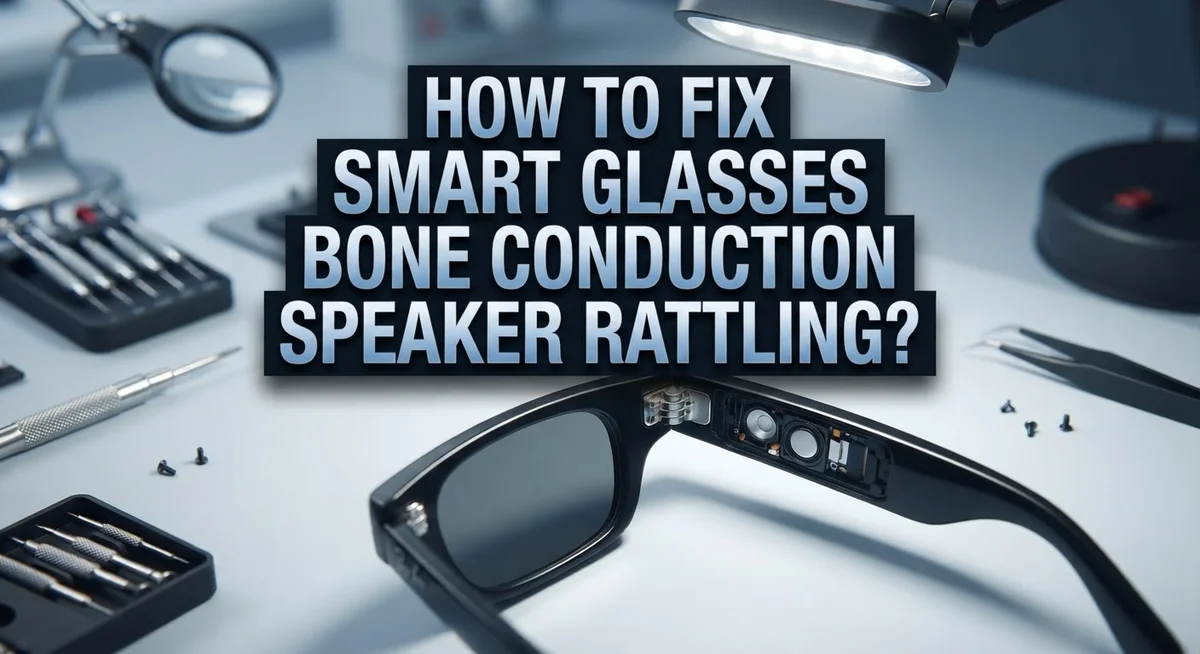
How To Fix Smart Glasses Bone Conduction Speaker Rattling?
Smart glasses bring music and calls right to your ears. But a strange rattling sound can ruin that experience fast. If your bone conduction speakers buzz or vibrate oddly, you are not alone.
This rattling noise often happens when you least expect it. You might notice it during a workout or a quiet phone call. It can turn a smooth listening session into an annoying distraction.
The good news? You can often fix this problem yourself. Most rattling issues come from simple causes. These include loose parts, dirt buildup, or software glitches.
This guide walks you through practical steps to solve the issue. We will explain why bone conduction speakers rattle in the first place. You will also learn how to clean your device properly.
In a Nutshell
- Loose screws are often the main cause of rattling sounds. A tiny screwdriver can tighten them fast.
- Debris buildup inside the speaker housing creates vibration noise. A soft brush clears out dust and dirt.
- Software glitches sometimes trigger strange sounds. A simple firmware update usually solves this quickly.
- Volume levels that are too high can cause the speaker to vibrate more. Lowering volume often reduces rattling.
- Physical damage from drops or pressure may loosen internal parts. Check your frame for cracks or bent areas.
- Temperature changes can affect how components fit together. Extreme heat or cold sometimes causes temporary rattling.
- Always test your glasses after each fix to see if the noise stops. This helps you find the exact cause faster.
- If home fixes don’t work, contact the manufacturer for support. They can guide you through warranty options or repairs.
Understanding Bone Conduction Speakers and Why They Rattle
Bone conduction speakers work differently than regular earbuds. Instead of playing sound into your ear canal, they vibrate against your skin. These vibrations travel through your bones to reach your inner ear. This technology lets you hear audio while keeping your ears open to the world around you.
The speaker itself sits on a small transducer. This transducer converts electrical signals into mechanical vibrations. When everything works properly, you get clear sound without discomfort. The vibrations stay controlled and focused on your skin.
Rattling happens when these vibrations become loose or uncontrolled. Think of it like a speaker cone that isn’t secured properly. Instead of smooth vibrations, you hear buzzing or rattling sounds. The transducer may move slightly during operation, creating unwanted noise.
Why does this happen? Several factors contribute to rattling in bone conduction speakers. The transducer mount can loosen over time with regular use. Internal components vibrate against the speaker housing instead of staying in place. Dust or debris can get trapped inside, interfering with smooth movement.
Temperature also plays a role. When your smart glasses heat up during use, materials expand slightly. When they cool down, they contract. This constant expanding and contracting can loosen connections gradually.
Physical stress makes rattling worse too. Dropping your glasses or applying pressure to the speaker area can shift internal parts. Even normal wear and tear eventually affects how tightly components fit together.
Understanding these causes helps you identify the right fix. You now know that rattling isn’t always a serious hardware failure. Often it’s simply a matter of loose parts or debris. The next steps involve checking what’s causing your specific problem.
Common Causes of Rattling in Smart Glasses Speakers
Bone conduction speakers work by sending vibrations through your skin to your inner ear. Unlike traditional speakers that push air, these devices create tiny movements on the bone behind your ear. When everything works properly, you hear clear sound without blocking your ear canal.
Rattling occurs when these vibrations shake loose components inside the speaker housing. The transducer itself vibrates at specific frequencies to create sound. If anything inside the speaker is not secured tightly, it moves with those vibrations and creates noise.
Loose internal components are the primary culprit. Over time, screws and fasteners work their way free from normal use. Even small movements of a millimeter can cause rattling sounds. The speaker housing may also develop tiny gaps where parts no longer fit snugly together.
Debris and dust accumulate inside the speaker over months of use. Particles settle near the transducer or inside the housing. When the speaker vibrates, these particles rattle against the internal surfaces. This creates a buzzing or grinding sound that gets worse at higher volumes.
Moisture damage weakens the bonds between components. Sweat from your skin or humidity in the air seeps into small gaps. This causes corrosion and loosens fasteners. Metal parts expand and contract, creating space where parts move freely.
Manufacturing defects sometimes cause rattling from day one. A screw may be slightly loose from the factory. A component might sit at an angle instead of flat against its mounting surface.
Understanding these causes helps you troubleshoot effectively. You now know whether the problem stems from loose parts, debris, moisture, or a manufacturing issue. This knowledge guides your repair approach and tells you when to seek professional help.
Step-by-Step Guide to Diagnosing the Rattling Noise
Start by isolating where the noise comes from. Put on your smart glasses in a quiet room and play audio at medium volume. Move your head slowly side to side. Notice if the rattling gets louder on one side or stays the same everywhere.
Next, gently press your finger against different parts of the speaker housing while sound plays. This helps you feel where vibrations are strongest. The rattling often comes from a specific spot rather than the entire speaker.
Listen carefully to the sound quality. Does it sound like a buzzing noise or a clicking sound? Buzzing usually means loose components inside. Clicking often points to debris hitting the speaker cone during vibration.
Check the frequency at which rattling happens. Does it occur at all volumes or only when you turn up the sound? High volume rattling suggests the speaker vibrates too much. Low volume rattling might indicate a serious internal problem.
Test different audio types to narrow down the issue. Try music, voice calls, and notifications. Some sounds trigger rattling more than others. This tells you whether the problem is hardware related or software triggered.
Examine the speaker area with good lighting. Look for visible cracks, dents, or loose parts around the bone conduction transducer. Use your eyes first before taking anything apart.
Pay attention to when the noise started. Did it begin after you dropped your glasses? Did it develop slowly over time? This timeline helps you understand whether you’re dealing with wear and tear or sudden damage.
Document what you find. Write down which side rattles, what sounds trigger it, and when it started. This information helps if you need to contact support later.
How To Fix Loose Components Causing Rattling
Loose components inside your smart glasses speaker housing are the main reason you hear rattling. The transducer, mounting brackets, and internal wiring can shift over time. When these parts move, they vibrate against the speaker housing and create that annoying noise.
Start by identifying which component is loose. Hold your glasses steady and gently tap around the speaker area with your finger. Listen for changes in the rattling sound. A dull thud means the component sits deeper inside. A sharp click means something sits near the surface.
Check the speaker grille first. This protective mesh sometimes loosens from its frame. Look for visible gaps between the grille and the housing. If you see space, the grille likely needs tightening.
Inspect the mounting brackets next. These hold the speaker in place against your temple. They can loosen from regular wear and tear. Gently wiggle the speaker housing to feel for movement. If it shifts easily, a bracket is probably loose.
Look at the connection points where wires attach to the speaker. Vibrations can gradually shake solder joints loose over months. Examine these joints with a magnifying glass under bright light. You might see tiny cracks or separation.
Check if any screws hold the speaker assembly together. These fasteners work their way loose from constant vibration. Look for gaps that shouldn’t be there. Count the screws to see if any are missing.
Document exactly where you find looseness. Take photos or notes about each loose area. This information helps you decide which fix to try first. Some loose parts need professional help. Others you can tighten yourself with simple tools.
Cleaning and Maintenance Tips To Prevent Future Rattling
Regular cleaning keeps your bone conduction speakers working smoothly. Dust and debris build up inside the speaker housing over time. This buildup causes vibrations to rattle against loose particles.
Clean the speaker grille gently with a soft, dry cloth. Use a microfiber cloth to avoid scratching the surface. Wipe in circular motions to remove surface dust. Never use water or liquid cleaners on the speaker itself.
For hard to reach areas, use a soft brush with fine bristles. Brush gently around the edges where the speaker connects to your glasses frame. Pay special attention to small gaps and crevices. These spots trap dust easily.
Check your glasses weekly for visible debris. Remove any lint or hair wrapped around the speaker area. This simple habit prevents major problems later.
Store your smart glasses in a clean, dry case when not wearing them. A protective case blocks dust and moisture from entering the speaker housing. Keep the case away from humid environments like bathrooms.
Inspect the speaker mounting brackets monthly. Make sure they stay tight and secure. Loose brackets vibrate more easily, making rattling worse. Tighten any brackets you find loose with appropriate tools.
Avoid exposing your glasses to extreme temperature changes. Heat and cold cause materials to expand and contract. This movement can loosen internal components over time. Store your glasses at room temperature when possible.
Moisture is another enemy of bone conduction speakers. Keep your glasses away from rain and sweat during intense exercise. If moisture gets inside, let the glasses dry completely before wearing them again.
These maintenance steps prevent most rattling issues. Small efforts now save you from bigger problems later.
Adjusting Fit and Positioning To Reduce Vibration Noise
The way your smart glasses sit on your head directly affects how much vibration noise you hear. Bone conduction speakers work by sending vibrations through your bones, so positioning matters greatly. When glasses fit too loosely, the speaker housing moves around and creates rattling sounds.
Start by adjusting the nose bridge first. Most smart glasses have adjustable nose pads. Loosen or tighten these pads until the glasses sit snugly without causing discomfort. The speaker should rest firmly against your temple bone without shifting when you move your head.
Check the temple arms next. These should curve around your ear and sit flat against your head. If the arms are too loose, they allow the speaker to vibrate independently from your skull. Tighten the hinges slightly to increase contact pressure. Be careful not to over tighten, as this causes discomfort and headaches.
Experiment with different wearing positions. Move the glasses slightly forward or backward on your head. You’ll notice the rattling changes at different positions. Find the spot where vibrations transfer smoothly into your bone without loose movement. Mark this position mentally so you can replicate it daily.
The angle matters too. Glasses that tilt forward or backward create gaps between the speaker and your skin. Keep them level and parallel to the ground for best results.
Wear appropriate headbands or straps if available. Some smart glasses accept optional stabilizing accessories. These keep everything in place during movement and exercise.
Test your adjustments by playing audio at moderate volume. Move your head side to side and up and down. Listen for any rattling that wasn’t there before. Small positioning tweaks often eliminate most vibration noise completely.
When Software or Firmware Updates Can Resolve Speaker Issues
Software and firmware updates often fix rattling sounds you hear from bone conduction speakers. Manufacturers release these updates to improve audio performance and address hardware communication issues.
Check for available updates regularly. Most smart glasses have a companion app on your phone. Open the app and look for a settings or support section. This is where you find update notifications. Some glasses check automatically, but manual checks ensure you don’t miss important fixes.
Updates can resolve several speaker problems. They may fix audio driver issues that cause vibration feedback. They can also adjust how the speaker sends power to the transducer. Sometimes the rattling happens because the firmware tells the speaker to vibrate at the wrong frequency. An update corrects this problem.
Before updating, charge your glasses fully. A dead battery during an update can cause serious problems. Connect your glasses to a stable internet connection. Use WiFi rather than mobile data for better stability. The update process usually takes a few minutes.
After the update completes, test your speakers immediately. Play music or audio at normal volume. Listen carefully for any remaining rattling sounds. The issue may disappear completely after the update.
If rattling persists after updating, the problem is likely physical. Loose components or mounting issues cause this type of noise. Return to checking hardware components like brackets and wires.
Keep your glasses updated going forward. Set reminders to check for new firmware monthly. Each update may include speaker optimizations. Regular updates prevent future rattling issues from developing. This simple step often prevents problems before they start.
Troubleshooting Persistent Rattling and Knowing When To Seek Repair
When you’ve tried cleaning, adjusting fit, and updating your software but the rattling continues, it’s time to evaluate whether professional repair is necessary. Persistent rattling that doesn’t improve after these steps usually signals an internal mechanical issue.
Listen carefully to identify where the sound comes from. Does it happen at all volume levels or only when you turn up the sound? Does it occur during calls, music, or both? This information helps you explain the problem clearly to a repair technician.
Test your glasses in different environments. Try them in a quiet room, outdoors, and in noisy spaces. Sometimes what feels like a speaker problem is actually environmental noise you’re picking up. If the rattling only happens in specific settings, the issue might be less serious than you think.
Check your warranty coverage before seeking repairs. Most smart glasses come with a limited warranty that covers manufacturing defects. Contact the manufacturer’s support team first. They can often diagnose problems through troubleshooting questions or video calls.
Consider the age and value of your glasses. If they’re several years old and repairs cost significantly, replacement might make more sense. Newer models often have improved bone conduction technology that sounds better anyway.
Document your issue with photos or videos showing when the rattling occurs. This evidence helps repair centers understand exactly what’s happening. Include details about when the problem started and what you’ve already tried.
Don’t ignore persistent rattling for extended periods. Continuing to use damaged speakers can worsen the problem and potentially create additional damage. A professional repair typically costs less than replacing your entire device, so addressing it promptly saves money in the long run.
Final Thoughts
Fixing a rattling bone conduction speaker doesn’t have to feel impossible. Most rattling problems come from simple causes like dust, debris, or loose fit. You can solve many issues yourself with basic cleaning and adjustments.
Start with the easiest fixes first. Clean your glasses regularly and check the fit on your head. These small steps solve most rattling problems without any technical work.
Software updates play a bigger role than people expect. Your smart glasses manufacturer often releases fixes for speaker issues. Always keep your device updated to avoid problems that updates could have prevented.
If basic fixes don’t work, physical damage might be the cause. Persistent rattling after trying everything usually means internal damage. This requires professional repair rather than home solutions.
Don’t wait too long to address ongoing rattling sounds. Small issues can turn into bigger problems if you ignore them. Your speakers might suffer permanent damage from continued use.
Your warranty status matters when deciding next steps. Check what coverage you have before paying for repairs yourself. Many manufacturers offer free fixes within the warranty period.
Think about how much you use your smart glasses daily. This helps you decide if repair costs make sense for your situation. Older devices might not be worth expensive repairs.
Taking care of your smart glasses prevents most rattling issues from happening. Regular cleaning, proper fit, and timely updates keep your speakers working well. When problems do occur, you now know exactly how to troubleshoot them step by step.
Trust your ears and your judgment throughout this process. You know your glasses better than anyone else does. Following these steps will help you enjoy clear, rattle free audio for a long time.
Frequently Asked Questions
Why does my bone conduction speaker rattle only at high volumes?
Bone conduction speakers vibrate against your skin to produce sound. Higher volumes create stronger vibrations. When components inside loosen even slightly, they knock against each other at louder levels. This creates the rattling sound you hear.
Start by lowering your volume to see if the rattling stops. If it does, your speaker likely has internal looseness. Try adjusting the fit of your glasses. Sometimes a tighter fit reduces vibration transfer to loose parts.
Can temperature changes cause bone conduction rattling?
Yes, temperature affects materials inside your glasses. Heat makes components expand slightly. Cold makes them contract. These tiny movements can loosen internal parts over time.
If you notice rattling after leaving your glasses in a hot car or cold environment, wait a few hours. Let them return to room temperature. The rattling may disappear once everything settles back to normal size.
Is rattling always a sign of permanent damage?
Not always. Temporary rattling can come from dust, debris, or a loose fit. Clean your glasses gently with a soft cloth. Check that all parts sit snugly against your head.
However, if rattling continues after cleaning and adjusting, internal damage may have occurred. The good news is that not all internal damage requires replacement. Some repairs are simple and affordable. Document when the rattling started to help a technician understand the problem.
Should I keep using my glasses if they rattle?
Using rattling glasses won’t hurt you, but it may worsen the problem. Continued vibration can loosen components further. This makes repairs more expensive later.
Give your glasses a break if rattling bothers you. Use them only when necessary until you address the issue. This prevents small problems from becoming major ones.
Hi, I’m Rosie Tate — a tech enthusiast, gadget geek, and the creator of RapidConvertLab! 🚀 I’ve spent years exploring the ever-evolving world of electronics, smart devices, and Amazon’s hidden tech treasures. Through my honest, hands-on reviews, I help everyday shoppers cut through the noise and pick gadgets that truly deliver value. When I’m not testing a new device, I’m probably unboxing one! 📦✨