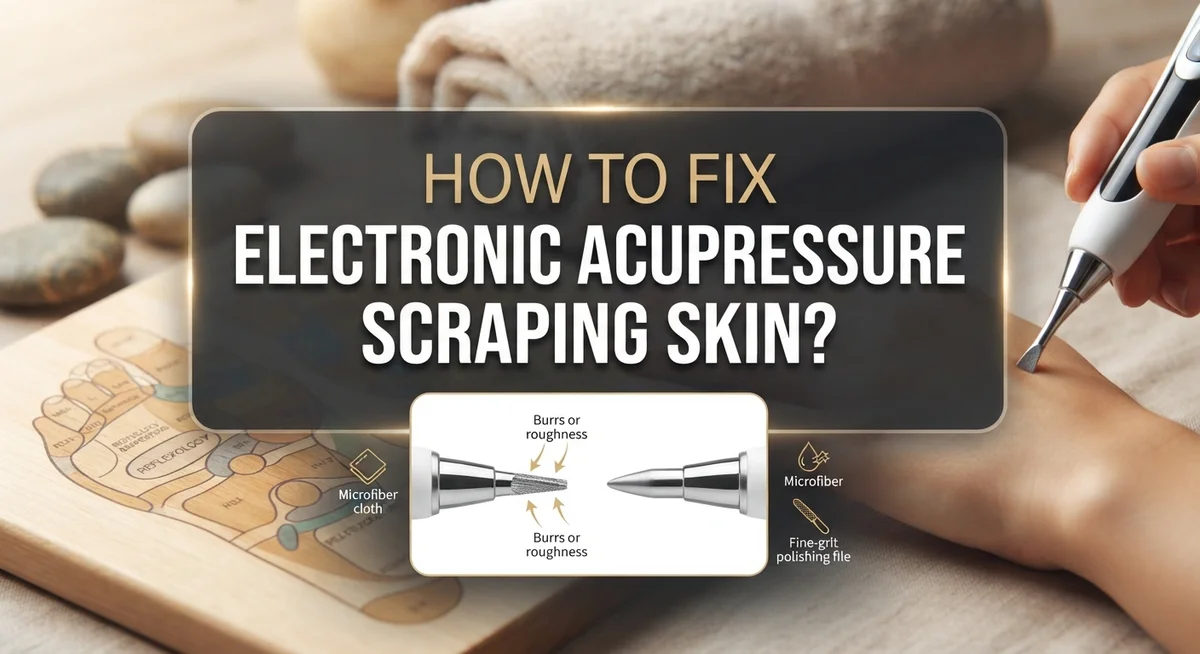
How To Fix Electronic Acupressure Pen Tip Scraping Skin?
Does your acupressure pen scratch your skin instead of soothing it? You are not alone. Many people face this issue when they first try these handy devices.
An electronic acupressure pen works by sending gentle pulses to your skin. It targets specific points to ease muscle tension and boost circulation. Some versions even offer facial cupping for a healthy glow.
But when the tip drags or scrapes, the experience turns uncomfortable fast. This usually happens due to a few simple mistakes. High settings and rough handling are often the main culprits.
In a Nutshell
- Start low, always. Begin at setting 3 or 4. High settings make the tip drag and irritate your skin.
- Keep skin slightly damp. Dry skin creates friction. A thin layer of oil or serum helps the tip glide smoothly.
- Use light pressure only. Pressing too hard forces the tip to scrape instead of glide. Let the device do the work.
- Check the tip for damage. A cracked or rough tip will scratch no matter how gentle you are. Inspect it regularly.
- Move slowly and steadily. Quick jerky motions cause dragging. Slide the pen in smooth, even strokes.
- Clean the tip often. Buildup of oil or residue can make the surface sticky and uneven, leading to scraping.
Why Your Acupressure Pen Scrapes Instead of Glides
Your acupressure pen scrapes skin for a few clear reasons. Understanding these causes helps you prevent the problem before it starts.
High intensity settings are the biggest culprit. When you turn the device to maximum power right away, the tip vibrates too aggressively against your skin. This rapid movement creates friction instead of the smooth, soothing sensation you want. Your skin cannot keep up with the force, so scraping happens.
Pressing too hard compounds the problem. Many people think more pressure means better results. In reality, the opposite is true. Pushing the pen firmly into your skin forces the tip to drag rather than glide smoothly across the surface.
Dry skin surface also causes scraping. Without moisture, there is nothing to help the tip slide easily. Friction builds up immediately, and your skin feels irritated instead of relaxed.
A damaged or worn tip can scrape even when you use correct technique. If the tip has rough edges, burrs, or cracks, it will catch on skin no matter how gently you apply it. Older devices sometimes develop this issue over time.
Moving too quickly across your skin creates unnecessary drag. When you rush the motion, the tip does not have time to deliver its pulsing sensation properly. Speed increases friction and reduces comfort.
Dirty device tips accumulate dead skin cells and residue. This buildup creates an uneven surface that scrapes rather than glides. Regular cleaning prevents this issue entirely.
Most scraping problems come from starting at high settings and using heavy pressure simultaneously. These two mistakes together almost guarantee an uncomfortable experience. Recognizing what causes scraping puts you in control of your device’s performance.
Correct Intensity Settings to Prevent Skin Irritation
Finding the right intensity setting is your first step to smooth, comfortable sessions. Most scraping happens because users jump to high settings right away. Your device likely has a dial or button that controls power levels from 1 to 10.
Start at level 3 or 4 every single time. This low setting delivers enough pulsing sensation to reach your muscles without grinding against your skin. Spend a few minutes at this level to see how your skin responds. You want to feel gentle vibrations, not aggressive pressure.
Pay close attention to how your skin reacts. If you feel any scratching or discomfort, stay at your current level or go even lower. Your skin will tell you what works. Some people need to stay at level 2 or 3 permanently, and that is completely normal.
Gradually increase intensity only after several sessions at lower settings. Move up just one level at a time, never jump multiple settings. Wait at least 3 to 5 days between increases so your skin adapts slowly.
Different body areas need different settings too. Facial skin is thinner and more sensitive than shoulder or leg muscles. Use lower settings on your face, around 2 to 4. Use slightly higher settings on thicker muscle areas, around 4 to 6.
The key is patience. Resist the urge to crank up power for faster results. Lower intensity actually works better because your skin stays comfortable and you can use the device more often. Consistency beats intensity every time when it comes to getting real results from your acupressure pen.
Step-by-Step Guide to Proper Pen Placement and Technique
Proper pen placement makes the difference between a soothing experience and skin irritation. Your technique matters just as much as your device settings.
Start by identifying your target area. Acupressure points are specific locations on your body. Find the exact spot before you turn on your device. This prevents random scanning that causes unnecessary scraping.
Hold the pen at a 90 degree angle to your skin. This perpendicular position lets the tip make even contact. Angled placement creates pressure points that dig and scrape. Keep your wrist steady and your hand relaxed.
Apply gentle downward pressure only. Think of it as a light touch, not a push. Your skin should feel the pulse, not the force. Heavy pressure transforms a healing tool into an irritant. Let the device do the work while you guide it.
Move the pen slowly across your skin. Glide it at a pace you can comfortably follow with your eyes. Rapid movements increase friction and cause scraping sensations. Slow, deliberate motions allow your skin to respond properly to the pulses.
Press the tip firmly enough to stay in contact with your skin. Loose contact causes bouncing and jumping, which creates scraping. Firm yet gentle pressure keeps the tip stable throughout your session.
Allow the pulsing sensation to build gradually. You should feel rhythmic vibrations, not scratching or dragging. If you feel scraping immediately, reduce your pressure or lower your intensity setting.
Practice on less sensitive areas first. Your forearms and legs tolerate pressure better than your face. Build your technique confidence before moving to delicate facial zones.
Consistency in your approach prevents most scraping problems. Repeating the same gentle technique trains your muscle memory for proper use.
Adjusting Pressure and Angle for a Smooth Glide
The angle at which you hold your acupressure pen directly affects how smoothly it glides across your skin. A 90 degree angle works best for most applications. This perpendicular position lets the tip make even contact without digging in or skipping.
Your pressure level matters just as much as the angle. Light pressure is always the goal. Many people press down too hard, thinking more force means better results. This assumption causes the scraping sensation you want to avoid.
Start by resting the pen tip on your skin with minimal downward force. The device does the work through its pulsing vibration, not through your hand pressure. Your job is simply to guide it and maintain contact.
As you move the pen across your skin, keep your hand steady and relaxed. Tension in your fingers and wrist causes you to press harder without realizing it. A loose grip helps maintain consistent, gentle contact.
Test different angles on a small area first. Tilt the pen slightly if the tip still catches or scrapes. Small adjustments of 5 to 10 degrees can make a significant difference in comfort.
Speed matters too. Move slowly and deliberately across your skin. Fast movements create drag and increase friction. Slow, smooth strokes let the pulsing action work effectively while the tip glides easily.
Pay attention to feedback from your skin. If you feel scraping, stop immediately. Adjust your angle down slightly or reduce pressure. Your skin will feel the difference within seconds.
Practice these adjustments on your forearm or neck first. These areas help you develop the right feel before moving to more sensitive zones. Once you find your ideal angle and pressure combination, consistency becomes automatic.
Common Mistakes That Cause Scraping and Irritation
Many people damage their skin with electronic acupressure pens simply by making preventable errors. Understanding these mistakes helps you avoid painful sessions and skin damage.
The biggest mistake is starting at high settings. Your skin needs time to adjust to the pulsing sensation. When you jump to level 7 or 8 immediately, the tip scrapes and irritates sensitive areas. Your face and neck are especially vulnerable because the skin is thinner there.
Applying too much pressure compounds scraping problems significantly. Some users think harder pressure means better results. This is false. Heavy downward force pushes the tip into your skin at an angle, causing the edges to catch and drag. Gentle contact is all you need for the device to work effectively.
Moving too quickly across your skin creates unnecessary drag and friction. Your skin cannot adjust to the pulsing motion when you rush. Slow, deliberate movements allow the tip to glide smoothly and let your skin respond properly to the treatment.
Using the device on completely dry skin increases scraping risk. Dry skin has less natural lubrication, so the tip catches more easily. A light moisturizer or hydrating serum creates a protective layer between the tip and your skin surface.
Holding the pen at incorrect angles also causes problems. When you tilt the pen instead of keeping it perpendicular to your skin, the edges of the tip dig in rather than the flat surface making contact.
Ignoring your skin’s feedback is another critical mistake. If you feel scraping, stinging, or excessive heat, stop immediately. These signals mean you need to lower your settings or adjust your technique. Your skin is telling you something is wrong.
Troubleshooting Persistent Scraping Issues
When your electronic acupressure pen continues to scrape your skin despite following basic techniques, you need a systematic approach to identify the root cause.
Check your device’s tip condition first. Over time, the metal or silicone tip can develop rough edges or wear unevenly. Run your finger gently across the tip to feel for burrs or sharp spots. If you notice damage, the tip may need replacement or professional servicing. A worn tip will scrape no matter how carefully you adjust your technique.
Examine your skin preparation next. Dry skin creates friction that amplifies scraping sensations. Apply a light moisturizer or hydrating serum before each session. The moisture acts as a buffer between the tip and your skin. This simple step resolves many persistent scraping complaints.
Test different speed settings systematically. Some users find that mid range settings (5 to 7) actually work better than low settings for their skin type. Start at setting 3, then gradually test setting 4, then 5. Notice which speed feels smooth versus scratchy on your skin.
Evaluate the target area itself. Sensitive facial skin scrapes more easily than thicker body areas. If scraping persists on your face, try using the device on your shoulders or forearms instead. This tells you whether the problem is device related or skin sensitivity related.
Consider your hand stability. Shaky hand movements create unpredictable friction patterns. Rest your arm on a table or support your hand with your other hand while using the device. Stability allows the tip to maintain consistent contact and glide smoothly.
If scraping continues after these checks, your device may have an internal issue requiring professional inspection.
Caring for Skin After Scraping Irritation Occurs
Your skin needs immediate care after an electronic acupressure pen causes scraping irritation. The first step is to stop using the device right away and assess the damage.
Gently rinse the affected area with cool water. Use your fingertips only, not a washcloth. Pat your skin dry with a soft towel. Avoid rubbing or applying pressure to the irritated zone.
Apply a soothing moisturizer to the scraped area. Look for products with calming ingredients like aloe vera or chamomile. These help reduce redness and promote healing. Moisturizing prevents your skin from becoming too dry during recovery.
If your skin feels hot or uncomfortable, use a cool compress. Wrap ice in a clean cloth and hold it against the irritation for 10 to 15 minutes. This reduces inflammation and numbs minor pain. Repeat this every few hours as needed.
Avoid makeup on the scraped area until it heals completely. Makeup can trap bacteria and slow recovery. Let your skin breathe and repair itself naturally.
Watch for signs of infection over the next few days. Increased redness, warmth, pus, or spreading irritation means you should see a doctor. Most minor scraping heals within 3 to 5 days.
Protect the area from sun exposure while healing. UV rays can darken healing skin and cause permanent discoloration. Wear loose clothing that covers the irritated zone, or apply sunscreen once the scraping stops oozing.
Skip all acupressure treatments until your skin fully recovers. Once healed, restart with extremely low settings and gentle pressure. Your skin needs time to bounce back before you resume any device use.
Maintaining Your Device Tip for Smooth Long-Term Use
Your electronic acupressure pen’s tip requires regular attention to prevent future scraping problems. A clean tip performs better and glides smoothly across your skin without catching or dragging.
Start by inspecting your device’s tip under good lighting. Look for visible debris, dried skin cells, or product buildup. These materials accumulate over time and create rough spots that scrape skin. Gently wipe the tip with a soft, dry cloth after each use. This simple step removes most surface particles immediately.
For deeper cleaning, use a slightly damp cloth with lukewarm water. Dampen the cloth just enough so it’s not dripping. Wipe the tip gently in circular motions. Allow the device to air dry completely before your next session. Never submerge the entire pen in water, as this damages internal components.
Check your tip’s surface texture regularly. Run your finger gently across it to feel for rough spots or irregularities. A smooth tip feels uniform and consistent. Any bumps or ridges mean your device needs professional inspection or replacement.
Store your device in a clean, dry location away from dust and humidity. Use a protective case if available. Avoid storing it near direct sunlight or heat sources, as these can warp the tip material.
Replace your tip according to the manufacturer’s guidelines. Tips wear down naturally with regular use. An older tip becomes less effective and more likely to cause scraping. Preventive replacement stops problems before they start.
Test your cleaned tip on a small skin area before full sessions. This confirms it glides smoothly without catching. Proper maintenance keeps your device performing safely and effectively for long term use.
Final Thoughts
Fixing tip scraping does not need to feel complicated. Most problems trace back to speed, angle, or skin prep. Once you understand these basics, smooth sessions become easy to repeat.
Your electronic acupressure pen works best when you respect its rhythm. Start slow, stay gentle, and let the device do its job. Rushing this process almost always leads to skin irritation.
Remember that low settings exist for good reason. They protect your skin while still delivering real benefits. You can always increase intensity once your skin adjusts.
Skin preparation matters just as much as device settings. Clean, slightly hydrated skin allows the tip to glide properly. Dry or oily skin creates friction that causes scraping.
Regular maintenance keeps your device performing well over time. Check your tip often, clean it properly, and store it safely. This simple habit prevents many scraping issues before they start.
If irritation does happen, respond quickly and calmly. Cool water, gentle moisturizer, and patience help skin heal fast. Avoid using the device again until your skin fully recovers.
Traditional Chinese medicine principles remind us that acupressure works with the body, not against it. Gentle, consistent pressure supports circulation and relaxation. Aggressive use only works against these natural benefits.
With practice, most people find their rhythm quickly. You will learn how much pressure feels right for your own skin. Every face and body responds a little differently.
Fixing scraping issues comes down to patience and attention. Slow down, watch your skin’s response, and adjust as needed. Your electronic acupressure pen can then become a relaxing part of your routine, not a source of frustration.
Frequently Asked Questions
Why does my electronic acupressure pen scrape my skin?
Scraping happens when you use the device incorrectly. The most common cause is starting at a high setting. Your skin needs time to adjust to the pulsing sensation. Pressing too hard against your skin also causes scraping and irritation. The device works best with gentle contact and low pressure.
What setting should I use to avoid scraping?
Always begin at setting 3 or 4. These low settings let your skin get used to the device. You can increase the setting gradually as your skin adapts. Never jump to high settings right away. Your skin will feel the pulsing sensation even at low levels.
How should I hold the device to prevent scraping?
Hold the pen lightly in your hand. Let the device do the work instead of pushing hard. Rest your hand on a stable surface if possible. This reduces accidental pressure from shaking or tension. Slide the device slowly across your skin rather than pressing it in one spot.
Can I use the device on sensitive facial areas?
Yes, but use extra caution on delicate skin. Start at the lowest setting on your face. Test the device on a small area first. Move slowly across the skin. Never hold the tip in one place too long. Your neck and under eye areas need gentler treatment than other body parts.
How long should each session last?
A few minutes per session is enough. Start with 2 to 3 minutes on any area. Your skin doesn’t need long sessions to benefit. Short, gentle sessions work better than long, intense ones. This approach prevents irritation and allows your skin to recover between uses.
Hi, I’m Rosie Tate — a tech enthusiast, gadget geek, and the creator of RapidConvertLab! 🚀 I’ve spent years exploring the ever-evolving world of electronics, smart devices, and Amazon’s hidden tech treasures. Through my honest, hands-on reviews, I help everyday shoppers cut through the noise and pick gadgets that truly deliver value. When I’m not testing a new device, I’m probably unboxing one! 📦✨